
55%
Of YouTube viewers drop off within the first 60 seconds. The hook is not a nice-to-have — it determines whether the rest of the script matters at all.
Over 55% of viewers drop off within the first 60 seconds of a YouTube video. That number gets worse if the creator is improvising. And it gets dramatically better when the video follows a script.
Writing a YouTube script isn't about memorizing every word. It's about knowing exactly what you're going to say, in what order, before you hit record. That prep work is what separates a video people finish from one they click away from in 30 seconds.
This guide covers the full process: the four-part structure that works for any format, how to choose your script style, a fill-in template you can use right now, and the one step most script guides skip entirely. How to capture the creator's voice before writing a single line.
Why YouTube Videos Need Scripts
The data here is consistent. Scripted YouTube videos average 40-60% audience retention. Unscripted videos average 25-35%. That gap doesn't come from better ideas or better production. It comes from better pacing and knowing exactly where you're going.
82% of full-time YouTubers with over 100,000 subscribers script their videos fully or work from a detailed outline. MrBeast and MKBHD both script every video word-for-word.
The most common objection to scripting is that it sounds robotic. But scripting doesn't make you sound robotic. It makes you sound prepared. The robotic delivery comes from reading word-for-word without internalizing the content. The fix is practice, not skipping the script.
Videos with a clear value proposition in the first 15 seconds see 18% higher retention at the one-minute mark. Scripts ensure that value proposition lands precisely where it needs to.
The Four Parts of Every YouTube Script
Every high-retention YouTube video follows a predictable four-part structure. The specific words change. The format and length change. The structure doesn't.
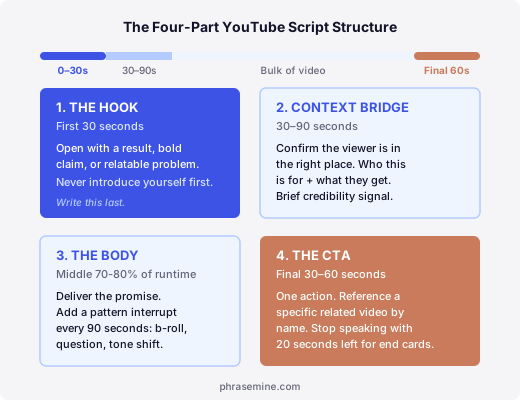
Part 1: The hook (first 30 seconds)
The hook determines whether the viewer stays or clicks away. You have roughly five to seven seconds to give them a reason to keep watching.
Before
“Hey guys, welcome back to the channel! Today we're going to be talking about YouTube scripts and how to write them...”
After
55% of your viewers leave before you finish your first sentence. Here's why that number is actually fixable — and it starts with how you open the video.
Open with a result, a bold claim, or a relatable problem. Never open with "Hey guys, welcome back." That's the fastest way to lose the audience you just earned from the thumbnail.
Five hook types that work:
- Bold claim: "Most YouTube scripts fail in the first 10 seconds, and I'll show you why."
- Open question: "What if the reason your channel isn't growing has nothing to do with your topic?"
- Story in the middle: "I was staring at my analytics dashboard and the retention graph looked like a ski slope."
- Shocking stat: "55% of your viewers leave before you finish your first sentence."
- Mistake preview: "There are five scripting mistakes killing your retention, and number three is the one I see every week."
One rule: write the hook last. After you finish the body, you'll know exactly what your video delivers. Then you can write a hook that precisely promises it.
Part 2: The context bridge (30-90 seconds)
Once the hook lands, the viewer needs confirmation they're in the right place. The context bridge does three things in under 60 seconds: states who this is for, says what they'll learn, and gives a brief credibility signal.
Keep this short. Context bridges that run past 90 seconds bleed retention before the real content starts.
Part 3: The body (middle 70-80% of the video)
The body is where you deliver the promise. Structure it around a clear through-line: a numbered list, a step-by-step process, or a comparison. The viewer should always know where they are and how much is left.
Add a pattern interrupt every 90 seconds. Viewer attention resets on a roughly 90-second cycle. A pattern interrupt can be a cut to b-roll, a direct question to the viewer, a shift in energy, or a quick visual. Mark it in your script as [PATTERN INTERRUPT] so you remember to do it during recording.
Part 4: The CTA (final 30-60 seconds)
One action. Not "subscribe, like, and comment." Pick one.
The CTA that consistently performs best: reference a specific related video by title and tell the viewer exactly what they'll learn from it. "Watch this next. It covers the other half of what I just showed you." Stop speaking with 20 seconds left so the end-screen cards have room to appear.
Three Script Formats (And When to Use Each)
There's no single right way to script. The right format depends on the creator's style and how the video will be recorded.
Full word-for-word script. Best for complex topics, creators prone to rambling, and any ghostwriting project. Every sentence is written out. The creator reads from a teleprompter or internalizes it before filming. At 150 words per minute, a 1,200-word script produces an 8-minute video.
Detailed outline. Best for experienced creators who want a natural, conversational delivery. The hook and CTA are written word-for-word. The body is structured as bullet points with one line per idea. The creator fills in the words during recording.
Hybrid. The most common format in practice. Word-for-word for the hook and CTA (precision matters most there), bullet points for the body. Captures natural delivery in the parts where tone carries the message, and exact language where the stakes are highest.
How to Capture the Creator's Voice Before You Write
This is the section every other scripting guide skips, because most are written for people scripting their own channel. When you're writing for a client, capturing their voice is the actual work. The structure is just the container.
Watch 10 videos before you write a word. Note:
- How long their sentences run on average
- How they open most videos (do they jump straight to the value, or do they tell a short story first?)
- Words and phrases they repeat without noticing
- How they address the audience (first-person vs. "you" directly vs. "we")
- What they do at transitions
Then watch the comments section. Comments reveal how the audience actually talks about the topic. The language viewers use in comments is the language that will land in the hook. "I've been struggling with this for months" becomes the hook's opening problem. "This changed how I think about it" becomes the outcome the hook promises.
Declan Davey, a freelance copywriter, used this approach when scripting a health and lifestyle YouTube video for Dr. Dave's 411, a cardiologist with 150,000 Facebook followers. The resulting video hit an 18% view-to-like ratio. The YouTube benchmark for the category is 4%. The difference wasn't the topic. It was how precisely the script matched the way Dr. Dave's audience talked about the subject.
PhraseMine makes this research step faster. You paste a brief about the creator's topic, and it pulls real Reddit conversations and organizes them by how the audience talks about the problem. That language goes directly into the hook and the key moments in the body.
Hear how your client's audience actually talks about their topic
PhraseMine searches Reddit for real conversations and organizes them by awareness stage. Paste a brief, get back the language before you write the script.
Try PhraseMine freeA YouTube Script Template You Can Use Now
This template uses the hybrid format: word-for-word hook and CTA, bullet-point body. Adjust based on the creator's format and the video length.
[HOOK: write this last]
Bold claim, relatable problem, or shocking stat. One to three sentences. No introduction.
[CONTEXT BRIDGE]
Who this is for: "If you're [specific situation], this is for you."
What they'll get: "By the end, you'll know how to [specific outcome]."
Credibility: One sentence on why you're the right person to cover this.
[BODY: bullet points per section]
- Point 1: [main idea in one line]
- Supporting detail or example
- [PATTERN INTERRUPT: note what the break will be]
- Point 2: [main idea in one line]
- Supporting detail or example
- Point 3: [main idea in one line]
- Supporting detail or example
- [PATTERN INTERRUPT]
Add or remove points. Keep each section under 300 words. No section should run past 90 seconds without a break.
[CTA: word-for-word]
"If you want to go deeper on [related topic], watch [specific video title] next. It covers [one sentence on what they'll learn]. I'll see you there."
[Stop speaking. End screen cards run for the last 20 seconds.]
Word count guide: 150 words ≈ 1 minute of on-screen speech. A 10-minute video needs roughly 1,500 words in the body.
Using This Template for Clients
When you're ghostwriting a script, the template stays the same. What changes is the research phase.
Before you touch the template, do the 10-video voice audit and the comments sweep. Know the creator's sentence rhythm, their recurring phrases, and the words their audience uses. Then fill in the template using those patterns. The script should sound like the creator, not like a script.
If you write audio scripts for the same client, the structure carries over with adjustments for the format. A podcast script replaces the hook with an episode open and cuts the visual instructions, but the four-part logic holds. The process for writing a podcast script covers what changes and what stays the same.
For research on a client's audience before you write anything, voice of customer research for copywriters covers the full method. And if you want to find the actual words their viewers use before scripting the hook, finding real customer language on Reddit shows you where to look.
The One Thing That Changes Everything
Scripts that retain viewers aren't written better. They're researched better. The hook that stops the scroll is the one built from language the audience already uses. The structure keeps them watching. The research is what makes them feel like the video was made for them.
That feeling of "this was made for me" is what drives the view-to-like ratios, the comments, the shares, and the algorithm signals that grow a channel. It doesn't come from the template. It comes from knowing the viewer before you write. PhraseMine is built for exactly that research step.